Go to here http://www.slide.com/
Sign Up and Login :)
Rabu, 14 September 2011

Senin, 12 September 2011
[Blackberry] An easy way to save energy
Here you can save Energy Batteries for Any Type Blackberry (Blackberry Bold, Blackberry Curve, Blackberry Curve, Blackberry Torch, Blackberry Curve, Blackberry Strom) ..
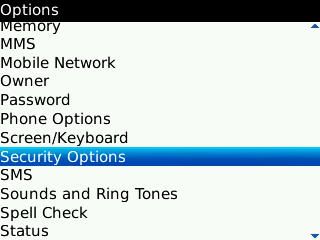
1. Go to Menu Options, select Security Options

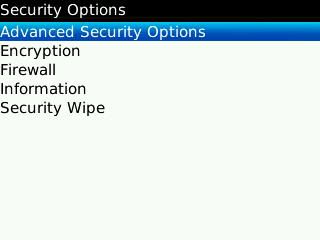
2. Go to the menu "Advanced Security Options"

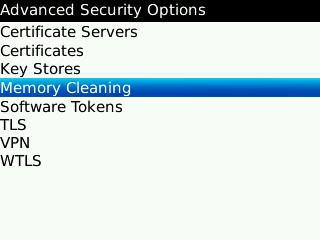
3. Then select "Memory Cleaning"


6. If so, press the BB menu icon, then select Save. And click "OK" on the warning that appears.


Memory Cleaner will run automatically clear the clipboard and optimizing memory on your BlackBerry. And will automatically run when yourBlackBerry is locked or restarted.
But the effect will make yourBlackBerry becomes slow when booting, because the Clean Memory will start when the new BlackBerry is switched on. But it would make the system more stable job, because the memory is clear.
If you do not want the old boot, you can make the choice to be disabled and do it manually Memory Clean.
Many activities can be done by theBlackBerry, so that the memory becomes full, and often result in all activities to be felt long. So that BlackBerry users often seek third-party applications to ease memory, prevent memory leak and even maximize the memory penggunana. Namely by using application Booster Memory, Flash Memory or the other.
But not everything is running normally, sometimes even yourBlackerry device so hang because the application does not fit.
Here are tips and ways you can use to address the full memory of yourBlackBerry with BlackBerry built applications.
Go to "Options" menu, then open "Security Options"
1. Go to Menu Options, select Security Options
2. Go to the menu "Advanced Security Options"
3. Then select "Memory Cleaning"
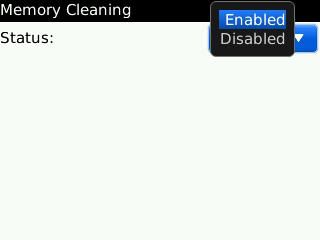
4. Select "Enabled"
5. Show Icon on Home Screen, select "Yes"
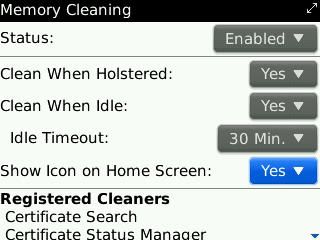
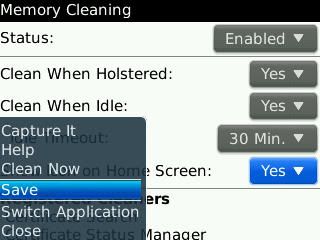
6. If so, press the BB menu icon, then select Save. And click "OK" on the warning that appears.
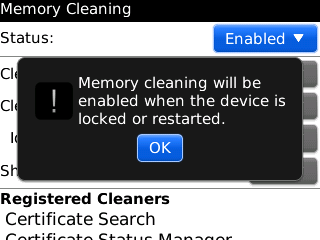
Memory Cleaner will run automatically clear the clipboard and optimizing memory on your BlackBerry. And will automatically run when your
But the effect will make your
If you do not want the old boot, you can make the choice to be disabled and do it manually Memory Clean.
Many activities can be done by the
But not everything is running normally, sometimes even your
Here are tips and ways you can use to address the full memory of your
Go to "Options" menu, then open "Security Options"
AVIRA PREMIUM 2012 + Crack

Sabtu, 10 September 2011
empire & allies complete cheat

This bot can
1. build up the Level FasterEmpire & allies
2.Empire & allies
1. build up the Level Faster
2.
3. automatic planting & harvesting
4. automatic help neigbord
4. automatic help neigbord
Download here : Click!!
Mirror : Click !!
How To use This..
1. First Install To your Computer
2. Open The
3. START
4. Login in to
5. Finish And Click START BOT

This my Acount :

My facebook : Click here !!
I'm level : 55
Coins : 35.293.000
and Go to Here http://indo-trick.blogspot.com/2011/09/mass-gift-material-empire-allies.html for
Mass Gift Material Empire & allies
Minggu, 04 September 2011
Facebook Chat to restore the Old version
Somehow and for what purpose it's Facebook Chat makes it look like now,, hehe seh if I prefer the look of old chat, how about you?
nah actually want to post about how long balikin chat to the old facebook let ga ribet (I think) ga tau dah if teman2 who prefer the look now..

Now we can restore the look of his chat up with no add ons that are installed into our browser.
Display the picture above is my Facebook Chat in Mozilla Firefox .. loh if its only just the add ons for Firefox? if that's his question then my answer is: D This plugin is now available for the top 3 browsers, ie Firfox Mozilla, Opera and Google Chrome, now for those who want to return the Facebook Chat to the old version please download it in accordance with the Add Ons you use Browser
Download Add Ons Firefox
Download Add Ons Opera
Download Untuk Browser Chrome
Good Luck..!!
nah actually want to post about how long balikin chat to the old facebook let ga ribet (I think) ga tau dah if teman2 who prefer the look now..

Now we can restore the look of his chat up with no add ons that are installed into our browser.
Display the picture above is my Facebook Chat in Mozilla Firefox .. loh if its only just the add ons for Firefox? if that's his question then my answer is: D This plugin is now available for the top 3 browsers, ie Firfox Mozilla, Opera and Google Chrome, now for those who want to return the Facebook Chat to the old version please download it in accordance with the Add Ons you use Browser
Download Add Ons Firefox
Download Add Ons Opera
Download Untuk Browser Chrome
Good Luck..!!
Sabtu, 03 September 2011
How To Fast Buffering Youtube

Use Firefox for more leverage. Download software video accelerator or SpeedBit http:/ / www.videoaccelerator.com/download/
In order to accelerate the SpeedBit follow the way below:
1. Download Firefox AddOn, "GreaseMonkey"
2. Open your web http://userscripts.org/scripts/show/33042, and click install, then click install again, refresh the youtube video that you watched. Youtube Enhancer script will exit. After that open link http: / / userscripts.org/scripts/show/26062, and click install, then click install again. It aims if there is a new update script Youtube Enhancer, a warning message will appear at the top FIREFOX. Making it easier for us to install a new script Youtube Enhancer by clicking the install button.
3. Under View the video of the note in Very Low Quality (flv), click it. After that, there are numbers 640, 960, etc., to change the size of the video. In addition there is a picture of the skull to stop buffering, so fast is bufferingnya View In Very Low Quality (flv).
How to Create a Website with Facebook Like This
Ok. In this article, I will try to explain briefly how to create websites that are equipped boxes like this or facebook facebook like, like the one at the box right of this page.
The first step is you have to make the fanpage first. Of course I am assuming that you already have a facebook account. Make this fan page from the main login page facebook on facebook.com.
When finished, go to the fanpage page and note the address listed at the place you used to write the website address in your browser.
There was a fanpage address you, and copy the numbers at the end of the address. This is the page id facebook fanpage you.
You can use a fanpage for the community when asked to choose.
Once ok, please go to this page http://developers.facebook.com/docs/reference/plugins/like-box facebook developers
You can choose whether to form a button or box and customize the display as desired. Paste the numbers you copied earlier into the field facebook page id.
Once done, click Get Code.
The next step is to copy the code from facebook to your web page. If you pake joomla or mambo like this prothelon.com, just create a new HTML module, and paste the code facebook is there..
Good luck.
The first step is you have to make the fanpage first. Of course I am assuming that you already have a facebook account. Make this fan page from the main login page facebook on facebook.com.
When finished, go to the fanpage page and note the address listed at the place you used to write the website address in your browser.
There was a fanpage address you, and copy the numbers at the end of the address. This is the page id facebook fanpage you.
You can use a fanpage for the community when asked to choose.
Once ok, please go to this page http://developers.facebook.com/docs/reference/plugins/like-box facebook developers
You can choose whether to form a button or box and customize the display as desired. Paste the numbers you copied earlier into the field facebook page id.
Once done, click Get Code.
The next step is to copy the code from facebook to your web page. If you pake joomla or mambo like this prothelon.com, just create a new HTML module, and paste the code facebook is there..
Good luck.
Langganan:
Postingan (Atom)